Your home and your rentals, all in order.
One-photo inventory for insurance, evidence to get your deposit back, rent, leases, reminders and PDF reports. One app that adapts to you, whether you rent, let, own or sell.
- No ads
- End-to-end encryption
- Works offline
- 19 languages
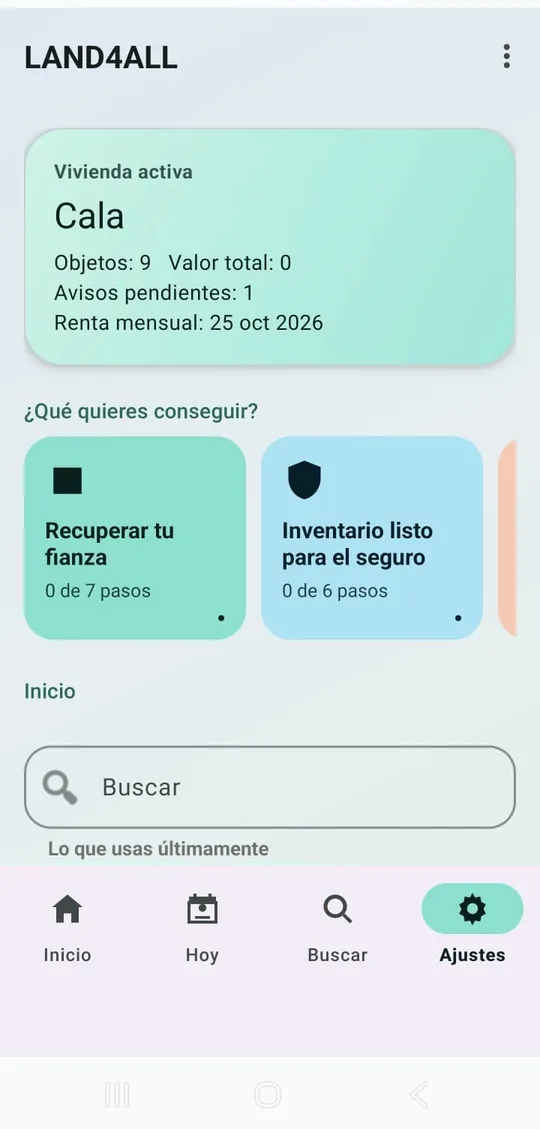
- 138tools
- 41calculators
- 24PDF report types
- 19languages
- 145currencies
What happens when there is no proof
Deposits and insurance claims are won or lost on paperwork. Almost nobody has it to hand when they need it.
of deposit disputes decided by TDS in England and Wales cite cleaning; 49% cite damage.
Source: NRLA / TDS, Dec 2025of homeowners don’t know how to check whether their insurance covers enough.
Source: Kin Insurance, 2025See how it works
Recorded with the real app, start to finish.
Pick your profile and the app keeps what you need
No wall of 138 tools: each profile sees its own, plus a step-by-step guide to its goal. Switch profile or turn everything on whenever you like.
«I rent my home. I want to document its condition, protect my deposit and never miss a payment.»
What you get
- Move-in condition with photos and a PDF report
- A dated log of repairs and everything said to the landlord
- Ready-made letters: repairs, notice to leave, deposit return
- Notice deadline with a reminder one week before
- Rent payment history that proves you pay on time
Suggested plan: Tenant
Guides you’ll see first
«I rent out one or more homes. I want to track rent, expenses, leases and inspections.»
What you get
- Paid, due and late rent at a glance
- Deposits, leases and renewals with reminders before they expire
- Income, expenses and a tax report per property
- Inspections with a PDF report and tenant onboarding
- Yield, occupancy and lost rent across the portfolio
Suggested plan: Landlord
Guides you’ll see first
«I own my home. I want to inventory it and keep it protected for insurance.»
What you get
- Home inventory with one photo per room
- Reads receipts and labels (brand, model, serial number)
- “Would your inventory hold up?” score with what’s missing
- Warranties, servicing and seasonal maintenance
- Home improvements that count when you sell
Suggested plan: Tenant (1 home: it also works if you own it)
Guides you’ll see first
«I manage properties for several clients. I want order, reports and professional documentation.»
What you get
- Leads and a sales pipeline
- Viewings, offers and closing deadlines
- Comparables, price range and a CMA report in PDF
- Estimated commission across the portfolio
- Owner reports with your branding
Suggested plan: Professional
Guides you’ll see first
«I'm moving. I want to know what I own, what's packed and that nothing gets lost.»
What you get
- Moving mode: what’s packed and in which box
- Moving budget and a moving-day checklist
- Transfer electricity, water and gas accounts
- Compare homes with numbers, commute included
- Meter readings on the way out and in
Suggested plan: Tenant
Guides you’ll see first
«I want to see everything the app offers and decide on my own.»
What you get
- All 138 tools in view
- Booking calendar and guest register
- Community: fees, minutes, levies and shared spaces
- Food expiry dates and a medicine cabinet with reminders
- 41 calculators to decide with numbers
Suggested plan: Free
Guides you’ll see first
Snap it, don’t type it
Doing an inventory by hand is so tedious that almost nobody finishes it. LAND4ALL turns it into a few taps.
Inventory from one photo
Photograph a room and the AI suggests up to 30 items with their category, in your language. You untick what you don’t want and add price and date: they are never made up.
The photo isn’t stored and is sent without locationRead a receipt
Turns a receipt photo into items with prices and checks that the total matches the printed subtotal. Each product goes to your inventory, pantry or shopping list.
Tested on real Walmart and ALDI receiptsLabels and barcodes
Brand, model and serial number are read on the phone itself, even in airplane mode. Barcode scanning doesn’t require camera permission for the app.
Offline, and the image never leaves the phoneWould your inventory hold up?
Scores whether your inventory would be enough for an insurance claim and tells you exactly what’s missing: prices, dates, photos or serial numbers.
With a list of what each room usually hasAI redesign
See your room in a new style, decluttered, cleaned up or empty. Ideas for decorating, selling or renting, from a photo of your own.
An AI-generated idea, not a real photo
The app tells you what to do next
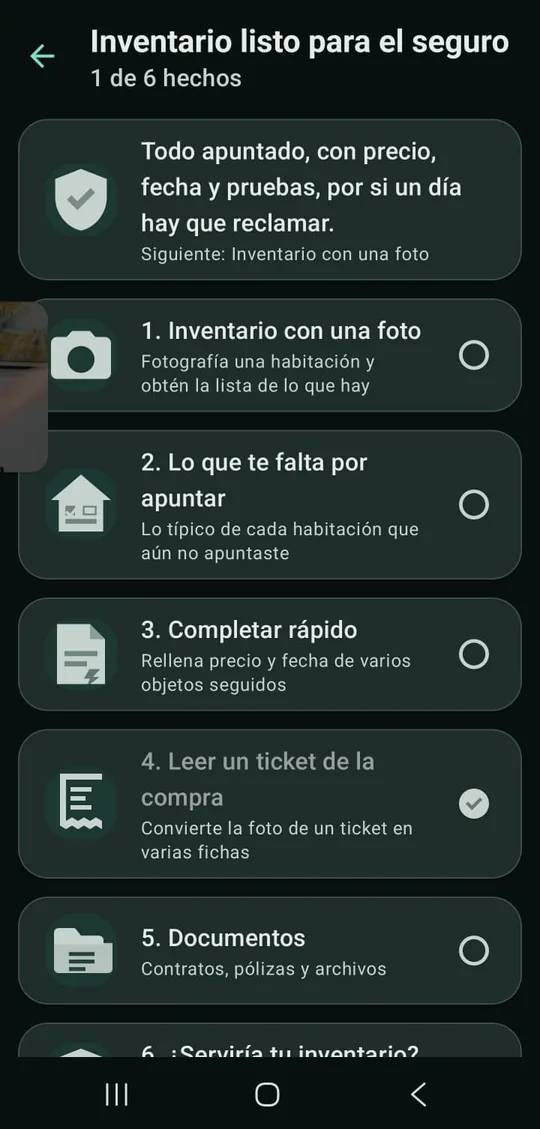
Each guide leads to a concrete goal and ticks steps off only when they are really done.
Get your deposit back
Photos on move-in, problems in writing and a move-out with no surprises.
Inventory ready for insurance
Everything listed, with price, date and proof, in case you ever need to claim.
Move without losing anything
Choose a home, budget, switch utilities and arrive with everything under control.
Rent to a new tenant
Choose well, sign them up, record the condition and hand over the keys.
Collect rent without slip-ups
Know who has paid, send reminders in time and keep the books.
End a tenancy
Notice deadlines, the move-out inspection and settling the deposit.
Home in shape all year
Seasonal checks, warranties and what to do if something breaks.
Accounts and taxes for the year
Income, expenses, improvements and mileage, ready for your accountant.
Get ready to sell
Prepare the home, set a price with data and gather the paperwork.
From client to closing
Leads, viewings, offers and deadlines until you get your commission.
Everything a home needs, in one place
Grouped into areas and filtered by your profile, so you find yours without searching.
Properties and inventory
Rooms, items with photos, value, warranty and documents. Search across all your properties.
Rentals and portfolio
Rent, deposits, renewals, occupancy, yield and expiries across your portfolio.
Money and expenses
Income, expenses, receipts, utilities and costs shared between flatmates.
Maintenance
Seasonal checks, repair history, contractors and home emergencies.
Records and evidence
Keys, issues, communications, leases and expiring documents, all dated.
Decide with numbers
41 calculators: mortgage, yield, rent vs buy, renovate or not, rent increases…
Agents and sales
Clients, viewings, offers, closing deadlines, comparables and commission.
Guests and community
Bookings, guest register, turnovers, fees, minutes and shared spaces.
Room-by-room inventory, inspection report, deposit settlement, owner statement, tax report, property sheet, CMA and more. With your name, contact details and logo if you want.
Your data is yours. Not even we can read it.
What you record lives encrypted on your phone. Cloud backup is optional and encrypted before it leaves, with a key only you hold.
Encrypted on your phone
Encrypted database and settings protected by the Android Keystore. PIN or fingerprint lock.
A backup we cannot open
Your backup is encrypted on the phone before upload. You recover it with 15 words only you know.
AI photos leave no trace
Only if you use it: the photo is sent without location and is not stored on any server.
No ads, no data selling
We live from subscriptions. Payments go through Google Play: we never see your card.
Built for everyone
One in six people worldwide lives with a significant disability, according to the WHO. LAND4ALL was designed from day one so nobody is left out.
See better
Five text sizes up to 160%, high contrast, light or dark theme and ✓ ▲ ✕ symbols next to colour for colour blindness.
Understand better
Dyslexia mode with more space between letters and lines, a 92-term glossary, words that explain themselves when tapped and help on 139 screens.
In your language and currency
19 complete languages, including right-to-left Arabic, 145 currencies, metric or imperial units.
Screen-reader ready
Every button and field is named for TalkBack, results are announced automatically and records can be read aloud.
Every accessibility feature, in detail →Also: reduce motion, captions on the videos and blue words with their meaning on this site.
Start free. Pay only if it’s worth it.
Plans renew automatically and you cancel from Google Play whenever you want. Prices in US dollars; Google Play shows them in your currency.
Tenant
For people renting their home
$49.99 a year
works out at $4.17 a month
- 1 property, unlimited items
- 5 GB encrypted cloud backup
- 2 devices
- 60 AI inventory photos a month
- 5 AI redesign images a month
Landlord
For letting one or more homes
$99.99 a year
works out at $8.33 a month
- Up to 5 properties
- 25 GB encrypted cloud backup
- 3 devices
- 200 AI inventory photos a month
- 20 AI redesign images a month
Professional
For agents and managers
$249.99 a year
works out at $20.83 a month
- Up to 25 properties
- 100 GB encrypted cloud backup
- 5 devices
- 600 AI inventory photos a month
- 60 AI redesign images a month
Business
For agencies and property managers
$599.99 a year
works out at $50.00 a month
- Up to 100 properties
- 500 GB encrypted cloud backup
- 15 devices
- 2,000 AI inventory photos a month
- 200 AI redesign images a month
What changes when you pay
| Free | With a plan | |
|---|---|---|
| Properties | 1 | 1 to 100, by plan |
| Inventory items | 25 | Unlimited |
| Tools and calculators | All | All |
| AI inventory photos | 10 a month | 60 to 2,000 a month |
| Encrypted cloud backup | — | 5 GB to 500 GB |
| Devices at once | 1 | 2 to 15 |
| AI room redesign | — | 5 to 200 images a month |
| Ads or data selling | Never | Never |
Common questions
When can I download it?
LAND4ALL is in closed testing on Google Play for Android. Write to us and we’ll add you as a tester; the public launch will be announced on this page.
Is there an iPhone version?
Android only for now. An iPhone version is on our roadmap.
Does it work offline?
Yes. What you record is stored on your phone and works without a connection, including reading receipts, labels and barcodes. You only need the internet for cloud backup, AI inventory and redesign, and distance calculations.
Can you read what I store?
No. The backup is encrypted on your phone with a key only you hold. We store a file we cannot open.
Will you ever ask for my password or my 15 words?
Never: not by email, phone or message. If someone claiming to be LAND4ALL asks for them, it is a scam: do not share them and write to us. Payments only ever happen inside Google Play.
What if I change phones?
With a plan that includes cloud backup, you sign in on the new phone and get everything back. Without a plan, you can export your data before switching.
If I stop paying, do I lose my data?
No. What is on your phone stays as it is. You can download your cloud backup for 60 days; it is kept for up to 12 months in case you come back, and then it is deleted.
Can I cancel any time?
Yes, in Google Play under Payments and subscriptions. You keep the plan until the end of the period you already paid for.
Is it useful for my tax return?
It gives you tidy numbers and an expense report you can export, but it is not tax advice: your accountant has the last word.
Want to try it before anyone else?
We are adding testers to the closed test on Google Play. Write to us and we’ll send you access.
Real people answer, not bots
Write in your own language. Inside the app, “Contact us” in Settings and in every screen’s help sends your message with your app version and phone model.
Something’s broken
Tell us what you were doing and what happened. A screenshot helps a lot.
Report a problemPayments and subscription
Charges, plans or cancellations. You can also cancel yourself in Google Play.
Write about a payment